


SpeedBox 3.1 B.Tuning for Brose and Specialized motors
5.0 · 3 reviewsDerestrict your e-bike to reach unlimited speed!
 This tuning kit ensures that your eBike's display shows accurate real-time speed
 Tuning kit removes all speed limits. Possible to set a preferred range.
 Once fitted, tuning kit needs to be activated and can be switched OFF/ON at will.

 FREE DELIVERY IN MOST REGIONS
 LIFETIME WARRANTY
 EASY TO INSTALL
What does this Tuning Kit do?
This new device brings a unique connection of e-bike and mobile phone. The SpeedBox 3.1 B.Tuning is a top-notch product perfectly optimized for the most powerful ride and experience. It suppresses the speed limiter so you can enjoy your ride at unlimited speed. Thanks to SpeedBox App mobile application you can monitor and store all the parameters of your trip on the display of your phone in any place, anytime.
Achievable speed
Calculate your speed
The achievable speed mostly depends on the eBike model. Enter your own values:
Check the highlighted values to see your speed.
Theoretical value from cadence and gearing only. Your real speed also depends on the motor, the tuning kit, the rider and the terrain.
Speed = cadence [rpm] × wheel circumference [mm] × front chainring teeth ÷ rear sprocket teeth × 60 [min/h] ÷ 1,000,000 [mm/km]
Which Speedbox Tuning Kit do I need?
Compatible with motors:
Brose SPECIALIZED (except for SL models)
For SL models use SpeedBox 3.0 for Specialized
Brose S-MAG
Brose S
Brose T
Brose C
Brose T-ALU
SRAM Powertrain by Brose
Not compatible with:
Brose S Mag FIT
Specialized GEN 4 (3.1/S-Works)
BROSE Specialized SL
(For SL models use SpeedBox 3.1 B.Tuning for Specialized)
E-bikes that do not have a connector in the display port (usually there is just a dummy plug instead)
Enviolo Automatiq
How to install this Tuning kit?
If you are planning to install SpeedBox on a brand-new bike, make sure you ride it for at least 0.6 miles (1 km) before the chip is activated.
Installation Guide:
Other tuning kits for Brose motors
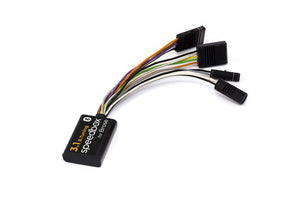 This kit
SpeedBox 3.1 B.Tuning for Brose and Specialized motors | 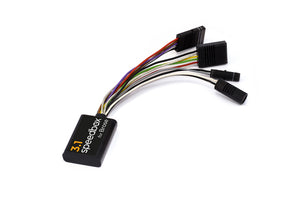 SpeedBox 3.1 for Brose and Specialized motors | |
|---|---|---|
| Price | 288.69 EUR | 185.93 EUR |
| Speed data | SHOWS REAL SPEED DATA | SHOWS REAL SPEED DATA |
| Max speed | UNLIMITED MAX SPEED SETTING | UNLIMITED MAX SPEED SETTING |
| Activation | ON/OFF TUNING ACTIVATION | ON/OFF TUNING ACTIVATION |
| Warranty | LIFETIME WARRANTY | LIFETIME WARRANTY |
| View kit |
FAQ & legal
How does SpeedBox 3.1 B.Tuning work?
Speed = Cadence [rpm] * Wheel circumference [mm] * Front Chainring Teeth / Rear Chainring Teeth * 60 [min/h] / 1.000.000 [mm/km]
Our newest product features an easy and user-friendly control unit. The tuning kit can be activated directly from the mobile application or on your bike’s display. By activating the WALK assist function shortly a value of 9.9 km/h (6.2 mph) is displayed and from now on you will be able to ride at a speed of 40 km/h, 50 km/h and even more than 60 km/h.
To deactivate the tuning kit, activate the WALK assist function again. The value of 2.5 km/h (1.6 mph) will appear on your display and the speed limit will reset to 25 km/h. Your e-bike will then work the same as before installation of the product.
SpeedBox was also designed for e-bikes that do not have a classic control unit with WALK assist function. In this case you can just use the combination of + - + - buttons and SpeedBox will be activated. You can easily deactivate SpeedBox in the same way.
You can set the maximum speed of an electric assistance in SpeedBox App or by changing modes: TURBO - TRAIL- ECO - OFF - ECO - TRAIL - TURBO. An actual speed limit will be displayed after that. The maximum speed of an electric assistance can be switched by activating WALK assist function shortly or by turning the rear wheel 360°. The value of 1,5 km/h on the display corresponds with the limit of 15 km/h, 2 km/h corresponds with the limit of 20 km/h, 2,5 corresponds with 25 km/h, 3,0 corresponds with 30 km/h, 9,9 corresponds with 99 km/h etc. The last displayed limit will be saved after 5 seconds of inactivity.
Activation and deactivation of SpeedBox tuning for e-bikes with SRAM Powertrain unit
To activate or deactivate the tuning, briefly activate the WALK function or switch between two assistance modes (+ - + -).
Activation of tuning (unlimited speed) → the display will show a battery value of 99%, which corresponds to a maximum speed of 99 km/h.
Deactivation of tuning (limited speed) → the display will show a battery value of 25%, which corresponds to a speed limit of 25 km/h.
Setting the maximum assistance speed:
To set your custom maximum assist speed, first open the SRAM AXS app and go to the Ride Modes section. Here, it is possible to adjust the parameters of individual modes, such as Max Power, which you first decrease three times and then increase three times. The control unit briefly displays the current speed limit as the battery level in %. Then, using the WALK function, gradually set the maximum speed – each press increases the battery value by 5%, which corresponds to raising the speed limit by 5 km/h. For example, showing 55% battery means a 55 km/h limit, 60% means 60 km/h, and so on. The last displayed limit is saved after five seconds of inactivity.
Important legal note!
The use of SpeedBox may void the warranty of your ebike.
We strongly recommend using other safety features and protective gear to prevent injuries in higher speeds.
SpeedBox Products are thoroughly tested and we stand by their quality. SpeedBox provide Life Long warranty to all their Products!
If You have any questions, please do not hesitate to contact us. Thank you for looking! Two Wheels Empire Team
eBike Software Updates
Warranty does not cover damage resulting from eBike software updates. Remove the tuning kit before updating the software. Check with us first to ensure the kit is compatible with your updated eBike. We cannot guarantee that the kit will function the same after updates. Please exercise caution. If your Speedbox tuning kit needs updating due to updated eBike software, please contact us at hi@twowheelsempire.com. Preliminary costs are 49£ + shipping costs.
What is the SpeedBox App?
SpeedBox App specifically designed for SpeedBox B.Tuning uses Bluetooth technology to connect your e-bike to your mobile phone. After downloading the application and connecting your phone to your electric bike, you can track the current data and riding parameters on your phone. You can save your trips, compare them with friends and monitor your own performance, so just enjoy the ride to the fullest and leave checking the parameters for later!
Main Features
SpeedBox B.Tuning chip can be used even without the SpeedBox App. However, it is a great accessory that will give you a complete overview of your performance. Most sport apps use only rough estimates of values. That’s why these data may differ from the real electric bike data by up to 20%. SpeedBox App displays completely accurate data, which is read directly from the electric bike's control unit.
Download now on: Google Play · App Store
Product safety information (GPSR)
Rider reviews
What riders say about this kit
Write a review
Loading reviews…
Loading reviews…
Need a hand?
Couldn’t find the perfect tuning kit?
No worries — reach out to us through the contact form below or ping us on WhatsApp!
We’re here to help, and we promise we’re friendlier than your bike’s squeaky brakes after a muddy ride!